

How Do I Change My Pet's Coverage?
How to change your pet's coverage to best fit their needs.
How Can I Increase My Coverage?
You can increase your pet’s coverage at any time, but it’s important to know that your policy is subject to re-underwriting. This is like starting a new policy. Meaning that waiting periods are reset and any injuries or illnesses that were symptomatic or diagnosed prior to increasing coverage would be considered pre-existing.
Increasing coverage includes:
Increasing the Annual Maximum
Increasing the Reimbursement Percentage
Decreasing the Annual Deductible
Note: Increasing coverage cannot be done via your MyEmbrace customer account online or in the Embrace Pet Insurance app. Please contact us to increase coverage for your pet.
How Can I Decrease My Coverage?
You can decrease your pet’s coverage any time during your policy year without interruption to waiting periods or coverage.
Decreasing coverage includes:
Decreasing the Annual Maximum
Decreasing the Reimbursement Percentage
Increasing the Annual Deductible
How Do I Decrease My Pet's Coverage On MyEmbrace?
1. Log in to MyEmbrace and select My Pets from the Quick Links menu

2. If you have more than one pet on the policy, select Edit coverage for the pet you'd like to make changes to
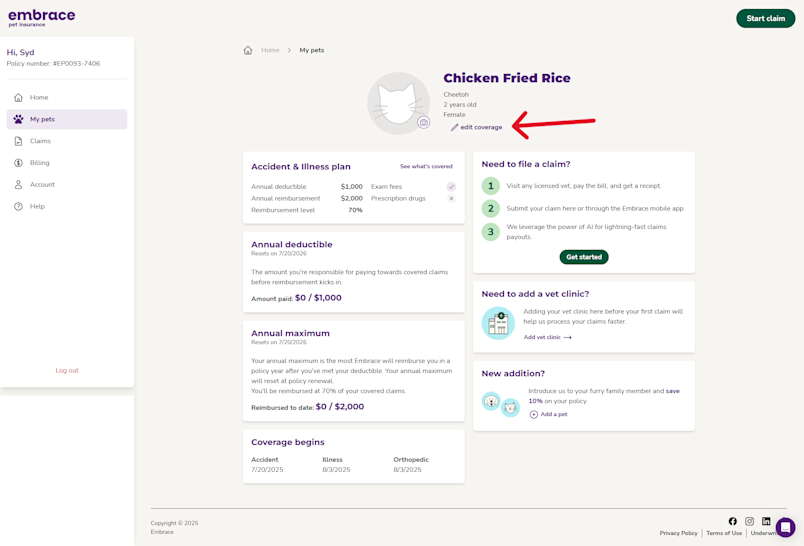
Note: If your policy is up for renewal, you will be redirected to a page that will ask you if you want to make changes to your current policy or as of your renewal.
By selecting Update Renewal Policy, changes won't take effect until your renewal date
By selecting Update Current Policy, changes will take effect at 12:01am ET two days from the date the change was initiated
3. The coverage options that are available to your pet are displayed on this page and you’ll see the new premium associated with the changes you make
The current coverage is labeled Current so you can compare the changes
Adjust coverage by selecting the available options:
Add or increase Wellness Rewards
Adding or increasing Wellness Rewards requires a one-time back-payment for all months to the start of your current policy period. Because Wellness Rewards is a non-insurance benefit, it is not prorated. If you would rather add Wellness Rewards at your renewal, please proceed changing coverage without it & contact us after
Select Review Plan

4. Your pet’s new coverage will be displayed here, including the annual deductible, annual maximum, reimbursement percentage, and premium
Select View finalized plan

Note: If you decrease coverage, increasing coverage later will reset your pet's waiting periods regardless of the coverage you changed from.
5. Review changes, including totals or credits due. You must check the box indicating that you have read all required documentation and agree to our terms and conditions before moving forward
Select Finalize Changes
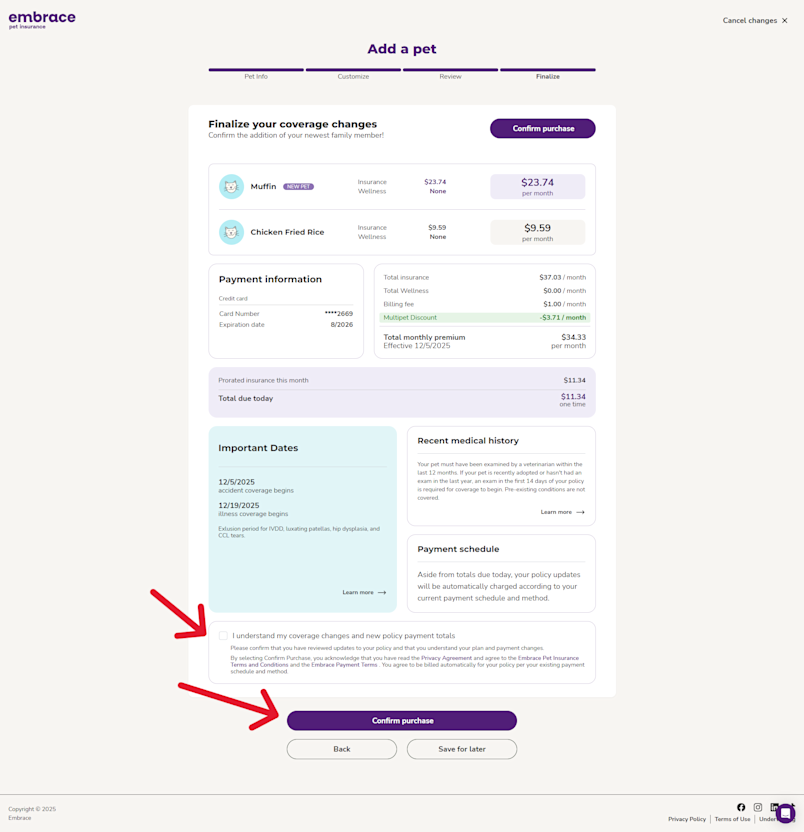
6. You will be directed to your confirmation page that provides links to all policy documents, a summary of your plan updates, your new premium, and totals or credits due
Any totals or credits due will be applied to your payment method on file
Why Am I Unable to Change Coverage Via MyEmbrace?
A change has been made to your policy within the last 24 hours
A change has been made since your renewal was created
You are within 5 days of your renewal date
Any pet on your policy has Accident Only coverage
If any of these scenarios apply to you or you're having trouble changing your coverage, please contact us.